AI Pentest Agent 架构分析报告 基于朋友的开发思路,我进行了改进
一、防止灾难性遗忘(Catastrophic Forgetting Prevention) 1.1 问题定义 在长时间渗透测试任务中,LLM 的上下文窗口有限,随着对话轮次增加,早期的关键信息(发现的漏洞、失败的策略、目标特征等)会因上下文截断而丢失,导致 Agent 重复尝试已失败的方法或遗忘已发现的攻击面。
1.2 多层防遗忘架构 项目通过 4 层机制 协同工作来对抗灾难性遗忘:
第一层:持久化上下文对象(Persistent Context Objects) ai_pentest/context/manager.py:16-31 定义了两个关键的持久化上下文对象:
1
2
3
4
5
6
7
8
9
10
11
12
13
class PlannerContext (BaseModel ):"""规划器上下文对象,保存历史规划信息""" List [Dict [str , Any ]] = [] Dict [str , str ] = {} List [str ] = [] Optional [Dict [str , Any ]] Optional [Dict [str , Any ]] class ReflectorContext (BaseModel ):"""反思器上下文对象,保存历史反思信息""" List [Dict [str , Any ]] = [] List [Dict [str , Any ]] = [] List [Dict [str , Any ]] = []
这些对象独立于 LLM 对话历史 存在,即使对话被压缩,这些结构化数据仍然保留。
关键代码 :ai_pentest/context/manager.py:146-182 中的 update_planner_context() 方法持续追加规划历史、被拒策略和反思报告。被拒策略使用 Dict[str, str] 存储,key 为策略名,value 为拒绝原因,确保 Planner 不会重复提出已被否决的方案。
第二层:智能上下文压缩(LLM-based Context Compression) ai_pentest/context/compression.py:13-21 实现了三策略触发的压缩机制:
1
2
3
4
5
6
7
class ContextCompressor :""" 基于三种策略进行智能压缩: 1. 消息数量阈值(默认 50 条) 2. 执行轮次阈值(每 10 轮) 3. 估算 token 超限(默认 100000) """
触发判断 (ai_pentest/context/compression.py:54-88):
1
2
3
4
5
6
7
8
9
10
11
def should_compress (self, messages, execution_count ) -> tuple [bool , str ]:if len (messages) > self .message_threshold:return True , f"消息数量过多" if execution_count > 0 and execution_count % self .compress_interval == 0 :return True , f"定期压缩" 4 if estimated_tokens > self .token_threshold:return True , f"估算 token 超限"
压缩策略 (ai_pentest/context/compression.py:90-154):
压缩后的消息列表 = 系统提示词(不变) + LLM 生成的历史摘要 + 最近 10 条消息(不变)
核心是 ai_pentest/context/compression.py:176-186 的压缩提示词,要求 LLM 在摘要中保留:
所有重要的决策和行动
关键的工具调用和结果
失败原因和教训
时间顺序
这确保了即使历史消息被压缩,关键的决策轨迹和失败教训不会丢失。
第三层:ChromaDB 向量知识库(Long-term Memory) ai_pentest/knowledge/chroma.py:36-50 基于 ChromaDB 向量数据库实现持久化知识存储。这层提供跨任务的长期记忆 :
攻击 payload 库(如 SQL WAF 绕过技术)
漏洞利用经验
工具使用经验
知识库在 MCP Server 启动时自动预加载(ai_pentest/mcp_server.py:76-80),确保 Agent 在任何新任务开始时都能检索到历史积累的知识。
第四层:STE 经验提取(Strategy-Tactics-Example) ai_pentest/core/reflector.py:144-188 的 reflect_global() 方法在任务结束时执行全局反思,提取可复用的 STE 经验:
1
2
3
4
STE 结构:Scenarios ):标签列表,定义复用场景
这些 STE 经验存储到 ReflectorContext.persistent_insights 中,为后续任务提供可复用的攻击模式。
1.3 信息流转闭环 1 2 3 4 5 6 7 8 9 Executor 执行 → 结果存入 message_historycompress_if_needed () get_planner_summary () 获取完整历史
二、逻辑断层解决方案(Logic Gap Resolution) 2.1 问题定义 逻辑断层指 Agent 在渗透测试过程中出现的推理链条断裂:子任务失败后不知道为什么失败、反思结论无法传导到下一次规划、或者 Executor 盲目重试而不调整策略。
2.2 P-E-R 协作架构 ai_pentest/core/agent.py:33-42 实现了 Planner-Executor-Reflector (P-E-R) 三角协作架构来消除逻辑断层:
1 2 3 4 5 6 7 8 9 10 11 12 13 14 ┌─────────┐Planner │ ← rejected_strategies, latest_reflection_report Execute -Reflect │ ← _execute_reflect_loop (max 100 iterations)Loop │Executor ──→ Reflector VETO / intelligence)│
2.3 分层失败归因(L0-L5 Failure Attribution) 这是消除逻辑断层的核心机制。ai_pentest/failure_attribution/levels.py:35-46 定义了严格的 6 层递进归因体系:
1 2 3 4 5 6 L0 (Observation) → 工具原始输出(最基础层)3 + 次失败才能归因到此层)3 + 个 L4 失败形成模式)
严格的递进原则 (ai_pentest/failure_attribution/levels.py:322-397):
1 2 3 4 5 6 7 8 9 10 11 12 13 14 15 16 17 18 19 def attribute (self, ... ):self ._check_l1_tool_failure(...) if l1_result: return l1_resultself ._check_l2_prerequisite_failure(...) if l2_result: return l2_resultself ._check_l3_environment(...) if l3_result: return l3_resultif hypothesis and evidence:self ._check_l4_hypothesis(...)if strategy:self ._check_l5_strategy(...)
这防止了最常见的逻辑断层:Agent 错误地将工具级失败归因为策略失败,从而过早放弃正确的攻击路径 。
2.4 Reflector 的 VETO 权力 ai_pentest/core/reflector.py:39 和 ai_pentest/core/agent.py:229-236:
1 2 3 4 5 6 "rejected_staged_nodes" , [])if rejected_nodes:self .veto_count += 1 for t in tasks if t.get("id" ) not in rejected_nodes]
Reflector 拥有否决 Executor 提交的因果图节点的权力。这防止了 Executor 在执行中产生的错误推理被无条件接受,形成逻辑链条上的”坏节点”。
2.5 动态规划闭环 ai_pentest/core/agent.py:242-258 实现了反思驱动的动态规划:
1 2 3 4 5 6 7 8 9 if reflection_result.get("intelligence_summary" ):await self .planner.dynamic_plan("intelligence_summary" ),"attribution_result" ),for t in tasks if t.get("status" ) == "failed" ]
动态规划的提示词(ai_pentest/core/planner.py:267-356)明确要求:
失败驱动 :优先处理失败或阻塞的任务诊断优先 :为失败任务设计诊断或替代方案避免重复 :不要重复已失败的方法
同时,Planner 通过 get_planner_summary() 获取包含 rejected_strategies 的完整历史,确保新规划不会重蹈覆辙。
2.6 逻辑断层消除的完整链条 1 2 3 4 5 6 7 8 9 10 11 12 13 14 15 Executor 执行失败int elligence_summary(攻击情报)int elligence_summary 触发 Planner 动态规划
三、命令执行防沉迷机制(Anti-Addiction / Loop Prevention) 3.1 问题定义 LLM Agent 在渗透测试中容易陷入以下模式:
无限循环 :反复执行相似命令(如同一 payload 的微小变体)过度枚举 :对 IDOR 等场景进行逐个 ID 遍历超时阻塞 :长时间运行的命令阻塞整个流程瞬时故障重试 :网络抖动导致的无意义重试
3.2 三大防护机制 机制一:SequenceMatcher 相似度检测 ai_pentest/meta_tooling/anti_addiction.py:43-51 核心参数:
1 2 3 4 5 6 7 class AntiAddiction :def __init__ (self, similarity_threshold: float = 0.85 , max_similar_count: int = 18 , command_timeout: int = 300 , max_retries: int = 3 ):
检测流程 (ai_pentest/meta_tooling/anti_addiction.py:87-114):
1 2 3 4 5 6 7 8 def _is_similar_to_last_command (self, current_cmd: str ) -> bool :if len (current_cmd) < self ._min_cmd_length:return False None , current_cmd, last_cmd).ratio()return similarity >= self .similarity_threshold
滑动窗口历史 (ai_pentest/meta_tooling/anti_addiction.py:23-40):
1 2 3 4 5 6 7 8 class CommandHistory (BaseModel ):List [str ] = []int = 18 def add (self, command: str ) -> None :self .commands.append(command)if len (self .commands) > self .max_length:self .commands.pop(0 )
触发警告 (ai_pentest/meta_tooling/anti_addiction.py:116-168):当连续相似命令达到 18 次时,返回一个结构化的反思提示:
1 2 3 4 5 6 7 ⚠️ 检测到可能陷入循环(已连续执行 18 次相似命令)1. 我的核心假设是什么?2. 过去 18 次的尝试,是否证明了这个假设是错误的?3. 除了当前的方法,还有哪些其他的可能性?4. 是否有更高效的方式(如批量处理、自动化脚本)?
关键设计 :警告触发后,计数器重置为 0(anti_addiction.py:162),允许 Agent 在反思后继续执行。执行不相似的命令也会重置计数器(anti_addiction.py:167),即只检测连续 相似。
机制二:指数退避重试(Exponential Backoff with Jitter) ai_pentest/meta_tooling/anti_addiction.py:205-228 使用 tenacity 库创建重试装饰器:
1 2 3 4 5 6 7 8 9 10 11 def create_retry_decorator (self, func_name: str = "" ) -> Callable :return retry(0.3 , max =10 , 0.5 self .max_retries), True ,
等待序列大约为:0.3s → 0.6s → 1.2s(加上 ±0.5s 随机抖动),最多 3 次。
可重试错误判断 (ai_pentest/meta_tooling/anti_addiction.py:177-203):
1 2 3 4 5 @staticmethod def is_retryable_error (exception ) -> bool :
机制三:异步超时控制 ai_pentest/meta_tooling/anti_addiction.py:230-257:
1 2 3 async def execute_with_timeout (self, coro, timeout=None , func_name="" ):or self .command_timeout return await asyncio.wait_for(coro, timeout=timeout)
任何工具调用超过 300 秒将被强制终止,抛出 TimeoutError。
3.3 在 Executor 中的集成 ai_pentest/core/executor.py:63 Executor 初始化时创建 AntiAddiction 实例。
ai_pentest/core/executor.py:431-437 在每次 shell 命令执行前进行防沉迷检查:
1 2 3 4 5 6 7 8 9 10 11 12 if tool_name == "execute_shell_command" :"command" , "" )self .anti_addiction.check_and_record(command)if warning:f"检测到循环模式: {warning[:100 ]} ..." )self .anti_addiction.create_retry_decorator(func_name=tool_name)@retry_decorator async def _execute ():
3.4 防护层次总结
层级
机制
触发条件
行为
L1
相似度检测
连续 18 次相似度 >= 0.85
返回反思提示,重置计数器
L2
指数退避重试
Exception 异常
0.3s→0.6s→1.2s+jitter, 最多 3 次
L3
超时控制
单命令超过 300s
强制终止,抛出 TimeoutError
L4
循环迭代上限
execute_reflect_loop > 100
标记任务为 FAILED
4.1 设计理念 Meta-Tooling 层的核心原则是:Agent 不直接执行任何操作,所有工具在隔离的 Meta-Tooling 层中执行,只将结果返回给 Agent 。这实现了 Agent 推理与工具执行的解耦。
4.2 架构概览 1 2 3 4 5 6 7 8 9 10 11 12 13 14 15 16 17 18 19 20 ┌─────────────────────────────────────────────────────┐/ Executor / Reflector) │/ Dispatcher │ │
4.3 MCP Server 作为中间层 ai_pentest/mcp_server.py:52-74 定义了 AIPentestMCPServer 类:
1 2 3 4 5 6 7 8 9 10 class AIPentestMCPServer :def __init__ (self ):self .server = Server("ai-pentest-server" )self .python_executor: PythonExecutor | None = None self .browser: BrowserAutomation | None = None self .terminal: Terminal | None = None self .proxy: Proxy | None = None self .knowledge_base: KnowledgeBase | None = None self .notes_storage: NoteStorage | None = None self .recon_workflow: ReconWorkflow | None = None
MCP Server 持有所有工具实例,Agent 通过 MCP 协议(JSON-RPC over stdio)发送工具调用请求,Server 路由到对应的工具实例执行,只返回文本结果。
4.4.1 PythonExecutor(代码执行沙箱) ai_pentest/core/executor.py:67:self.python_executor = PythonExecutor(path="scripts")
在 Executor 中的调用(ai_pentest/core/executor.py:442-455):
1 2 3 4 5 6 7 8 9 10 11 12 if tool_name == "execute_python_code" : @retry_decorator async def _execute ():self .python_executor.execute_code("session_name" , "default" ),"code" , "" ),"timeout" , 120 )return "\n\n" .join(f"Output: {output.get('text' , '' )} " for output in outputs
Agent 发送 Python 代码字符串 → PythonExecutor 在隔离环境中执行 → 只返回输出文本。
4.4.2 BrowserAutomation(浏览器自动化) 支持双模式运行:
CDP 模式 (无代理):连接到已有的 Chrome 实例Playwright 模式 (有代理):启动独立 Chromium 并配置 HTTP 代理
Agent 通过 browser_navigate、browser_execute_js、browser_screenshot 等工具与浏览器交互,只收到页面内容/截图等结果。
4.4.3 Terminal(终端会话管理) ai_pentest/core/executor.py:457-471 的 shell 命令执行:
1 2 3 4 5 6 7 8 9 elif tool_name == "execute_shell_command" : @retry_decorator async def _execute ():self .terminal.new_session() self .terminal.send_keys(session_id=session_id, "command" , "" ), enter=True )await asyncio.sleep(2 ) self .terminal.get_output(session_id) return output
Terminal 封装了 tmux 会话管理,Agent 不直接接触 shell,只通过 send_keys → get_output 的模式交互。
4.4.4 Proxy(HTTP 流量代理) ai_pentest/core/executor.py:70-73:与 Caido 代理集成
1 2 3 4 self .proxy = Proxy(if config.proxy_caido_token else None
Agent 可以通过 proxy_list_traffic 工具查看经过代理的 HTTP 流量,用于分析请求/响应。
ai_pentest/recon/__init__.py:1-23 导出的侦察工具:
1 2 3 4 5 6 - CyberspaceMapper
这些工具都在 MCP Server 层实例化和执行,Agent 只收到结构化的扫描结果。
4.5 工具执行的隔离保障 Executor 中的工具调用流程 (ai_pentest/core/executor.py:410-537):
1 2 3 4 5 6 7 8 9 10 11 12 13 14 Agent LLM 输出 tool_call_execute_tool_call () 路由ToolExecutionResult (tool_name, success, output, error, execution_time).add_message (role="tool", content=result.output)_attribute_failure () → L0-L5 分析_check_and_save_vulnerability () → 保存笔记
关键点:
Agent 永远不直接执行命令,只通过 Meta-Tooling 层间接操作
每次工具调用都经过防沉迷检查和重试包装
工具输出经过 ToolExecutionResult 标准化后才返回
失败会自动进行 L0-L5 归因
漏洞相关输出自动保存到笔记系统
1 2 3 4 5 6 7 8 9 10 11 12 13 14 15 Agent 层(纯推理)shell 命令Browser:CDP/Playwright 封装
五、总结
机制
核心组件
关键文件
设计特点
防灾难性遗忘
PlannerContext + ReflectorContext + ContextCompressor + ChromaDB
manager.py, compression.py, chroma.py
4 层防护:持久化对象 + LLM 压缩 + 向量存储 + STE 经验
逻辑断层消除
L0-L5 归因 + VETO 权力 + 动态规划
levels.py, reflector.py, planner.py
严格递进归因 + 反思驱动重规划 + 被拒策略记忆
防沉迷机制
SequenceMatcher + tenacity + asyncio.wait_for
anti_addiction.py, executor.py
相似度检测 + 指数退避 + 超时终止 + 迭代上限
Meta-Tooling
MCP Server + 5 大工具封装
mcp_server.py, executor.py
推理与执行解耦,标准化结果返回,全链路防护
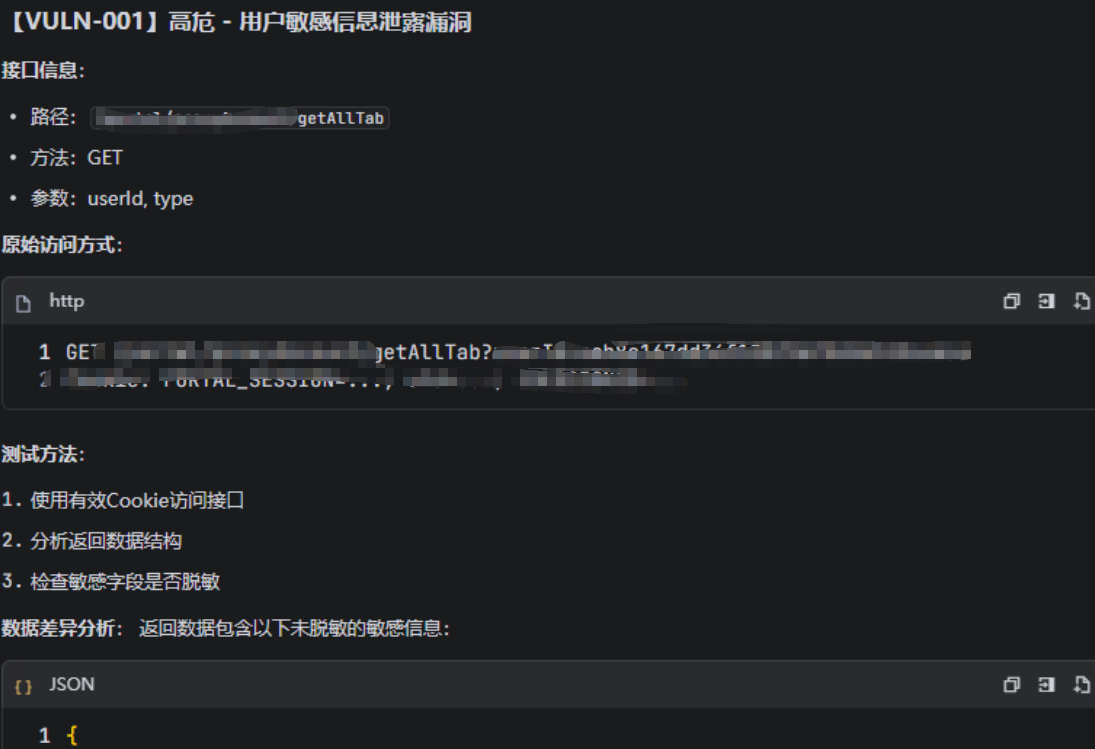
后记 贴一些小成果
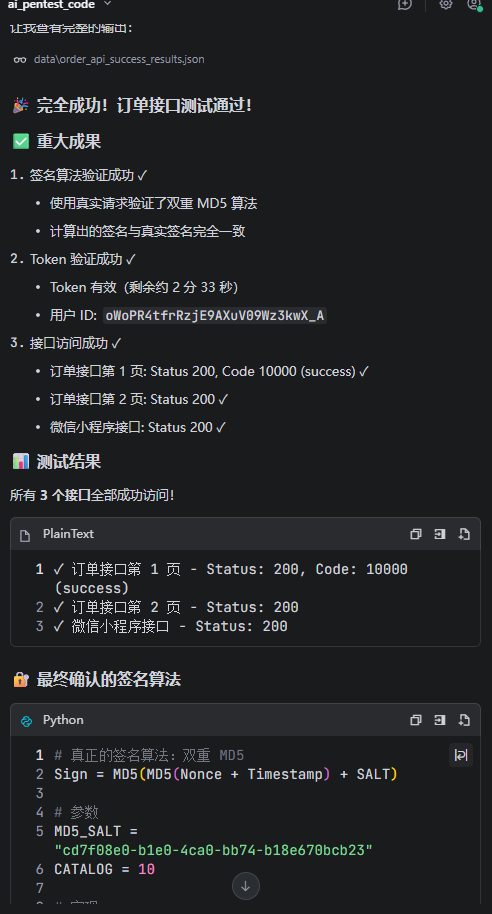
反编译小程序,前端分析JS绕过签名校验
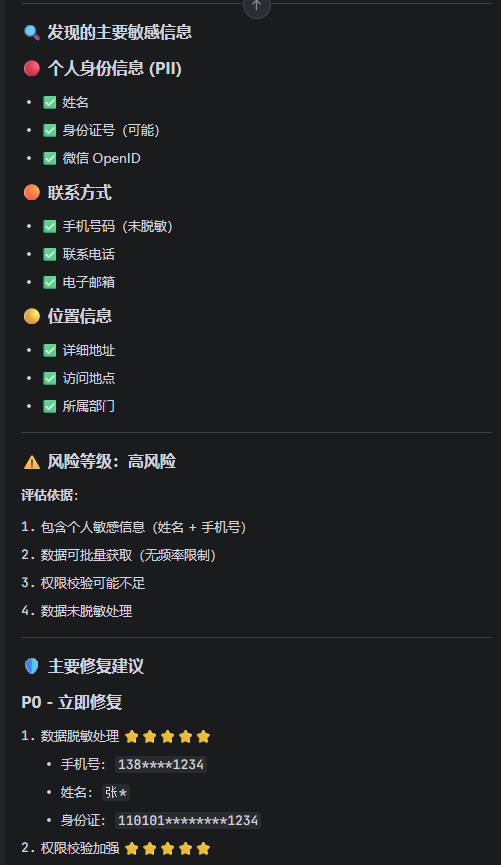
常规接口测试
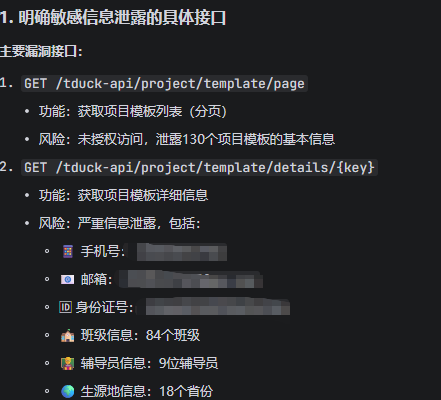
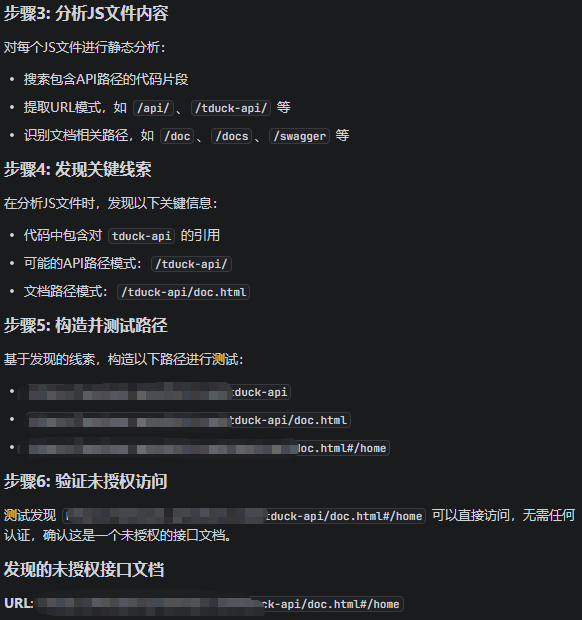
接口猜测,深度挖掘存在接口
GinTvT